
Contacts and voices
Contacts
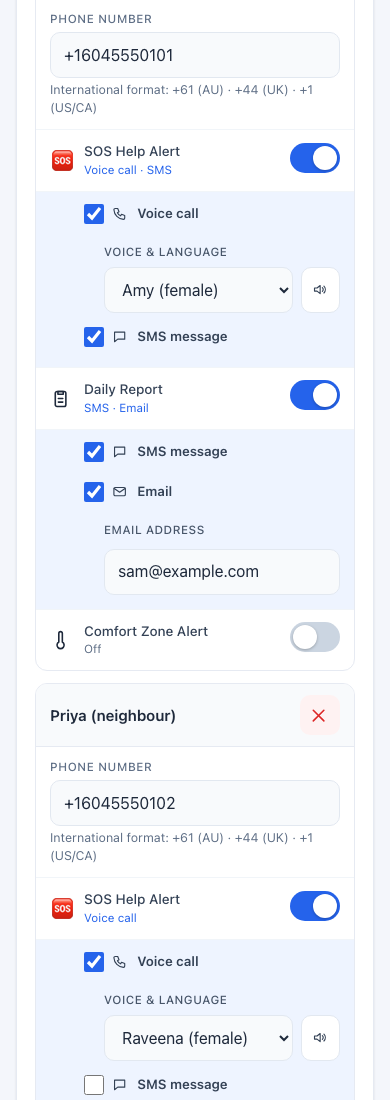
Section titled “Contacts”In the Carers tab, press Add contact for each person: their name and phone number (with the country code, such as +16045550100), and then switch on what they should receive. Each contact can receive things independently.
| Group | Choices per contact |
|---|---|
| Call Carer button | Voice call, text message (SMS), or both. |
| Daily report | Text message, email, or both. For email, type the address. |
| Comfort zone alert | Voice call, text message, or both. (Appears once you have switched on Comfort Zone in the Resident tab.) |
Each group holds up to four people.
Push alerts to your phone are separate: they are set up per phone in the carer portal, and need no phone number.
Voices
Section titled “Voices”JeanScreen can speak. You choose a voice in Resident → Audio Preferences:
- Resident voice: used for spoken reminders on the device and for the reminder call to the resident. Voices include several English accents (British, Australian, American, Indian), and Mandarin, Japanese, Korean, Spanish, French, German, Italian and Brazilian Portuguese.
- Speaker volume: 0 to 100 percent (starts at 60). Test it at the chair where the person sits, with the television off, and with someone who has the hearing the resident has.
- 🔊 plays a sample in your browser; 📻 plays it through the JeanScreen speaker.
Each contact also has their own voice and language for Call Carer calls, so a relative who speaks another language hears the message in it. The message is translated automatically if the voice is not English.
Spoken reminders need the home Wi-Fi. If Wi-Fi is down, the device plays a chime instead.